Ask a question about the software in front of you. AIPilot reads your window and circles the exact button. Native, private, instant.
↑ Ask in plain words — it reads your window and circles the answer.
macOS 14+ · Apple Silicon & Intel · 10 free questions a day

Everything a copilot should do when the software in front of you has 900 buttons.
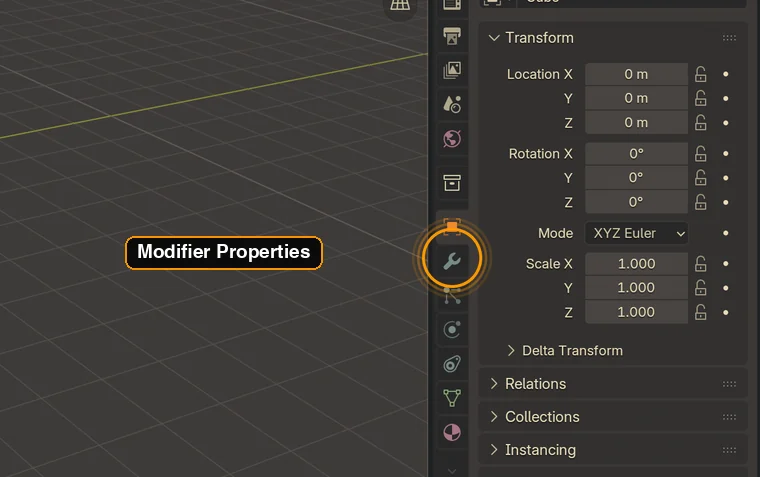
The answer is drawn straight onto your screenshot: a ring, an arrow, a label. No "it's somewhere in the panel on the right".
One click attaches the app window you're learning — not your whole desktop, not your other screens.
A conceptual question doesn't need a screenshot. AIPilot decides before capturing, so plain answers come back instantly.
It knows Blender's layout by heart — workspaces, editors, panel names — so it answers with the software's own vocabulary.
If a keystroke exists, you get it. Learn the interface once, then stop using it.
A Liquid Glass panel on top of your app. You never alt-tab, never lose the thing you were looking at.
Ask in French, get French. Ask in Japanese, get Japanese — with the software's original term kept intact.
Swift & SwiftUI. No Electron, no bundled browser. It starts in the time it takes to press a shortcut.
No account, no history on our side. A capture is sent to answer, then dropped. Never a background recording.
10 questions a day, free forever. Unlimited when 10 isn't enough.
A problem? Write to us
Blender 4.x today, with a dedicated expert context. Other dense apps — DaVinci Resolve, Xcode, Godot, Photoshop — are next. On anything else it still answers, it just identifies the interface from the capture first.
No. Nothing is captured until you ask a question that needs it, and only the window you picked is sent. macOS asks for the screen recording permission once — you can revoke it at any time in System Settings.
No. A capture travels to the model, comes back as an answer, and is dropped. No account, no stored history, no training on your screen.
The counter resets every day. If you hit the ceiling often, the subscription lifts it entirely — same app, no other difference.
Yes. AIPilot runs on Apple Silicon and Intel alike, from macOS 14 onward.
Drag the app to the trash. No system files, no leftovers.